AI Design Tools • Yelp
Idea → Motion: designing micro-interactions with AI
ROLE • Lead Designer // TEAM • Solo, with engineering handoff // TIMELINE • A few days per prototype
At Yelp, I built an AI-powered workflow for designing micro-interactions. I designed the ideas and key assets by hand, then used Figma Make, Framer, VS Code + Copilot & Claude to turn them into working prototypes with real motion and real values.
Small moments, felt early
Small moments make a product feel alive: a goal that clicks into place, a review that unlocks, a card that invites a tap. They are also the hardest to communicate. A static mock can’t show how something should feel, and a GIF leaves engineering guessing.
At Yelp, I built an AI-powered workflow to close that gap. I design the idea and key assets by hand, then use AI to turn them into working prototypes with real motion, real interaction and real values engineers can build from.
19
micro-animations
5
shipped to production
4
AI Tools
1
native iOS build
Motion is designed last and cut first
Motion usually arrives at the end of a project, described in a spec or a video. It takes days to prototype, and it rarely survives handoff intact. Engineers rebuild it from a recording, the timing drifts, and the moment loses what made it feel good.

I wanted a faster loop: from idea to something the team can feel in hours instead of days, and something engineering can lift from instead of reverse-engineer.
Four steps, and a clear split of who does what
AI doesn’t own the design. I own the idea, the assets and the final call on how it feels; AI does the heavy lifting in between.
STEP 01
IDEA & ASSETS
Me: I spot a small moment that could feel better and design the concept, key visuals and assets by hand.
AI: Sounding board for variations.
STEP 02
PROMPT & ITERATE
Me: I describe the motion in plain words: the states, the timing, how it should feel. Then I direct, critique and tune.
AI: Drafts the motion and interaction code.
STEP 03
PROTOTYPE
Me: A working HTML / CSS / JS prototype in the browser, refined until it feels right.
AI: Builds and refactors on request.
STEP 04
ENG HANDOFF
Me: Engineering gets runnable code and exact values (springs, durations, curves), not a GIF to reverse-engineer.
AI: Packages the code and, when needed, ports it to native SwiftUI.
Four tools, one idea-first process
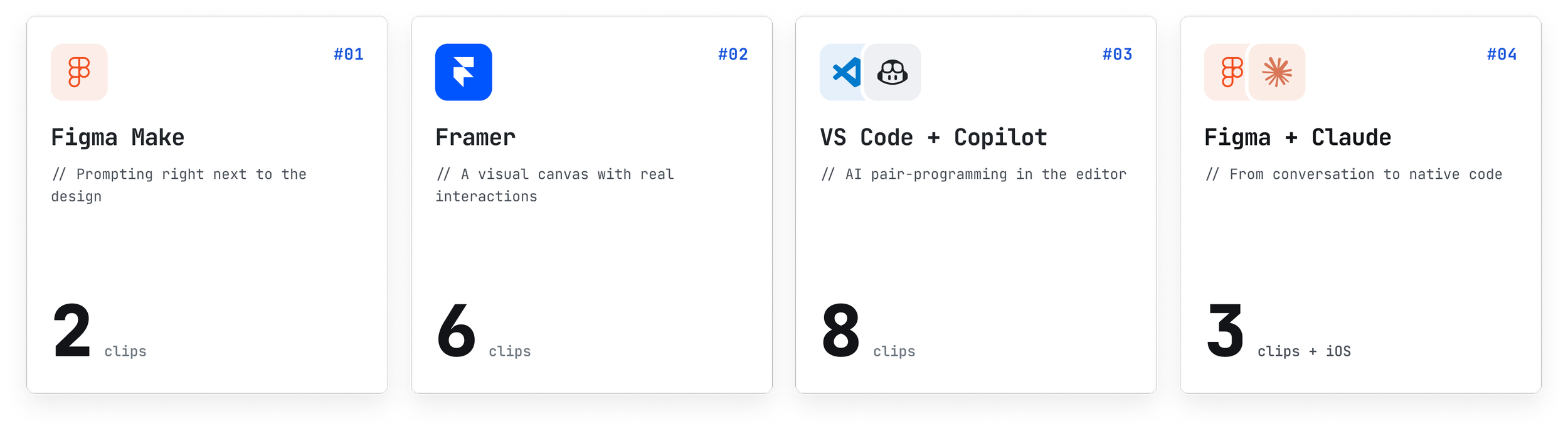
I matched the tool to the job, from design-side to code-native. The process stayed the same; only the output changed.

Prompting right next to the design
The fastest jump from a static frame to something that moves. I used it for review moments: a gentle gate that invites people to log in before reading more reviews, and a label that celebrates someone’s own review.
SHIPPED
Gating reviews
A motion example for the login gate on reviews.
EXPLORATION • NOT SHIPPED
“Your review” label
Saving space and clutter for the users.

A visual canvas with real interactions
Framer’s built-in AI let me prompt interactions directly on a phone-sized canvas. The team could feel two or four options side by side instead of debating them in a meeting.
EXPLORATION • SHIPPED A DIFFERENT VERSION
Photo carousel
Two directions for the business-page hero image carousel, shown side by side.
SHIPPED • VERSION D
Pitch card, four ways
Four motion directions for a promotional card.
Version A
Version B
Version C
Version D

AI pair-programming in the editor
When the output needed to be code that engineers could open, read and reuse, I paired with Copilot in VS Code. Every prototype is plain HTML, CSS and JavaScript.
SHIPPED
Gated reviews: login to unlock the filter
Review cards and a login gate that reveal the filter after sign-in.
SHIPPED
Web referral: three hooks, one production cut
Home feed, Open now and Wait time explored; one animated version shipped.
EXPLORATION • NOT SHIPPED
Q&A, asked by Yelp Assistant
A question bubble that animates in from the assistant.

From conversation to native code
This is where the workflow went furthest. With Claude Code, I could describe a moment in plain words, get a working prototype back in minutes, iterate on it in conversation, and take it all the way to native SwiftUI. Claude didn’t just draft the motion; it carried the logic, the physics and the structure through every version.
SHIPPED
Map place carousel
A card carousel synced to map pins, prototyped in conversation and handed to engineering.
EXPLORATION • NOT SHIPPED
Dining challenge: Connect Four
A playful progress pattern for a dining challenge, where each visit drops a piece into the grid.
EXPLORATION • NOT SHIPPED
Dining challenge: Punch Card
The same challenge as a classic punch card, each visit stamping a new hole.
Note: The dining challenges above were explorations for features that have not shipped. They are shown here to illustrate how the AI workflow powered the exploration phase, not as released product.
DEEP DIVE • “GOAL SELECTION” PROJECT
From an idea to a native build in one conversation
Goal Selection is a dock-style magnifying ruler for picking a monthly goal, with category pills that sparkle when you level up. It was the best test of the workflow: it started as a sketch, became an HTML prototype, and ended as a native SwiftUI build, without ever leaving the conversation.
Three iterations
VERSION 1
HTML sketch
The ruler and pills, just to find the first feel.
VERSION 2
HTML prototype
Icons, helper text and real physics: momentum, friction and a spring snap to the nearest tick.
VERSION 3
Native SwiftUI
The same interaction running on iPhone 17 Pro (iOS 26), with haptics on every tick and on level-up.
Same physics, two languages
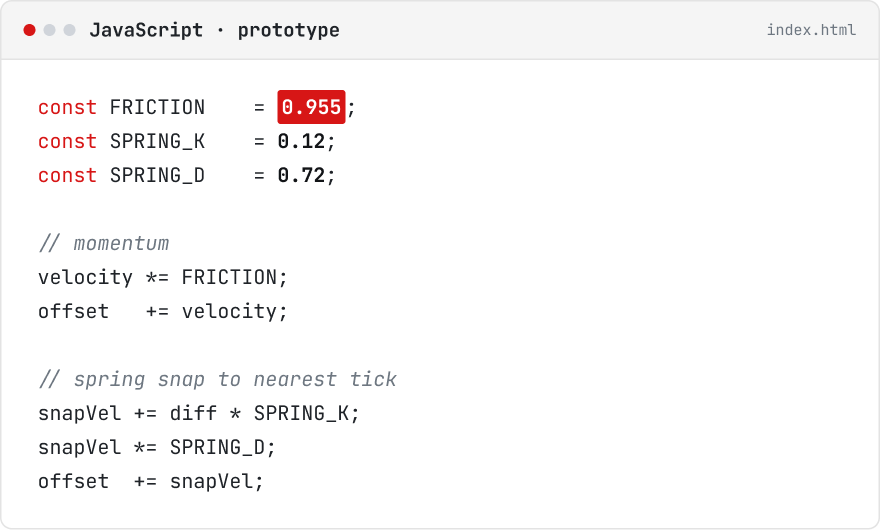
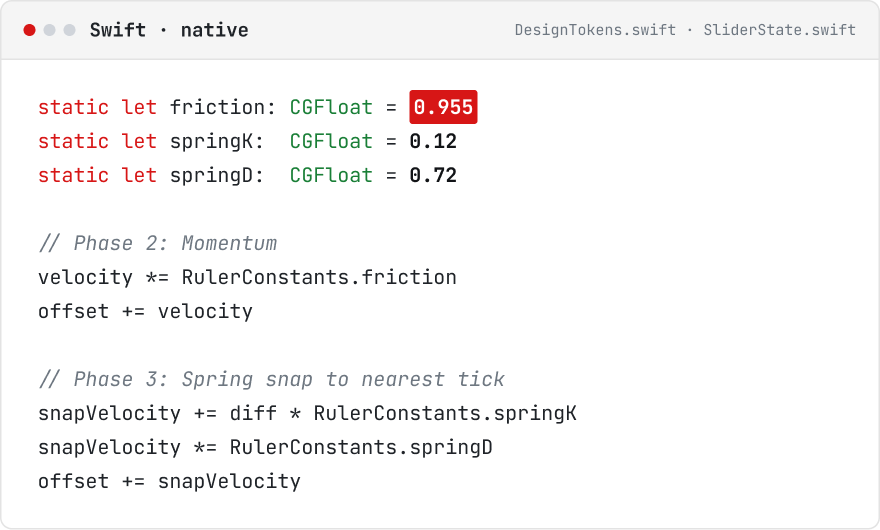
I tuned the feel by eye in the browser: friction 0.955, spring stiffness 0.12, damping 0.72. Those exact values carried over to Swift unchanged. No guessing from a video, no “make it feel like the prototype” tickets.
What engineering gets
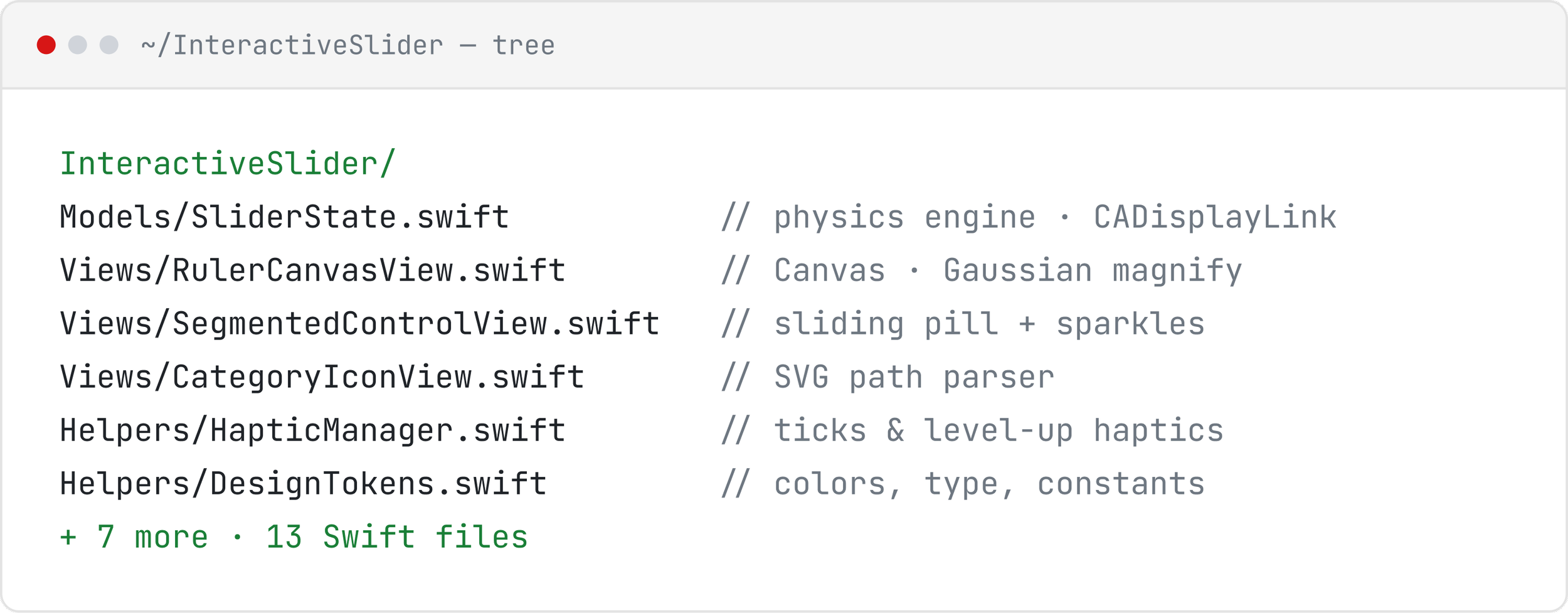
Instead of a spec, the handoff was a structured Xcode project: 13 Swift files covering a physics engine driven by CADisplayLink, a Canvas ruler with a Gaussian magnify effect, the sliding pill with sparkles, an SVG icon parser, haptics, and a single DesignTokens file for colors, type and constants. Built with SwiftUI and Swift 6 for iOS 18+.
What changed
Small moments make a product feel alive: a goal that clicks into place, a review that unlocks, a card that invites a tap. They are also the hardest to communicate. A static mock can’t show how something should feel, and a GIF leaves engineering guessing.
At Yelp, I built an AI-powered workflow to close that gap. I design the idea and key assets by hand, then use AI to turn them into working prototypes with real motion, real interaction and real values engineers can build from.
FASTER LOOP
Motion prototypes in hours, not days. Each tool set took a few days to explore end to end, to find the right feeling.
CLEANER HANDOFF
Engineers received runnable code and exact values. Clearer direction and, five pieces shipped to production.
BETTER DECISIONS
The team chose between options they could feel side by side, instead of debating screenshots.
WIDER EXPLORATION
Ideas that would have stayed as a static frame could be tested natively before anyone committed to building them.
The idea is still the hard part. Prototyping it is now cheap.
AI didn’t replace the design decisions. It removed the distance between having an idea and feeling it in your hand, so more of my time went to the part that matters: deciding what should move, and why.